Built for warehouse efficiency
Every tool you need to manage incoming stock, purchase orders, bin locations, picking, and fulfillment from your Shopify admin panel.
Manage incoming stock with purchase orders, suppliers, barcode receiving, received product checks, and putaway locations before inventory is made available in Shopify.
- Create supplier purchase orders with products, quantities, costs, taxes, shipping, tracking, and expected arrival dates
- Receive products by barcode, SKU scan, or manual quantity entry as goods arrive
- Check ordered, received, and remaining quantities so partial deliveries stay clear
- Arrange received products into bin locations during putaway, then update Shopify inventory when stock is physically in place
- Keep supplier order history connected to the same warehouse workflow as picking and fulfillment
Supplier
North Coast Apparel
Ordered
120
Checked
96
Remaining
24
SKU-TEE-BLK-M
24 received
SKU-CAP-NVY
54 received
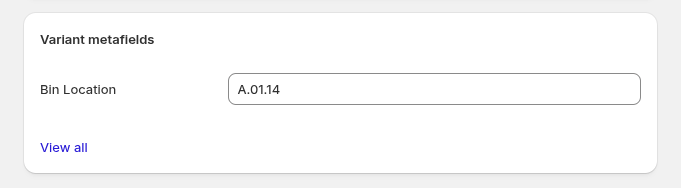
Bin locations live on product variants in Shopify as ipk_logistics.bin_location. Operational records are stored by the app. A physical bin is distinct from the Shopify stock location selected in Settings.
- Prepare or reuse the metafield in the setup wizard or Settings
- Identifies variants by SKU or barcode — your choice
- Import CSV with location and sku or barcode headers; export your current catalog and bin locations as CSV
- Variants are grouped and sorted by bin location, with product title as a secondary sort; this is not calculated route optimization
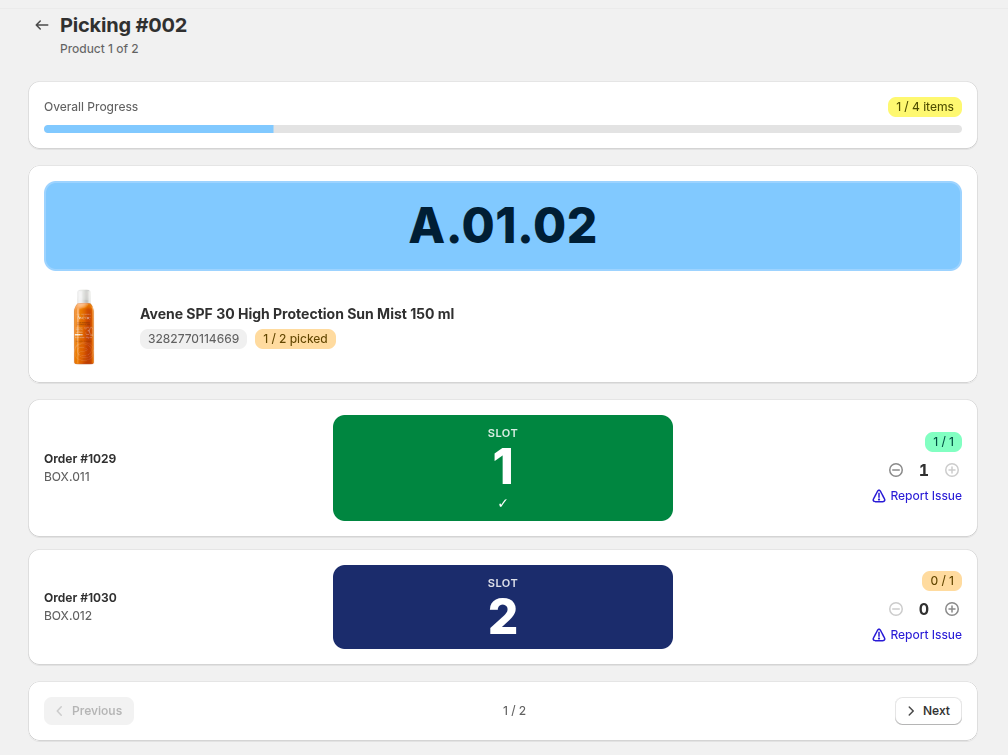
Pick one order at a time without containers, or group orders into rounds using carts or individually identified boxes. Follow bin locations, confirm quantities, and report picking issues.
- Create a round: select order statuses (paid, pending, authorized), choose how many orders
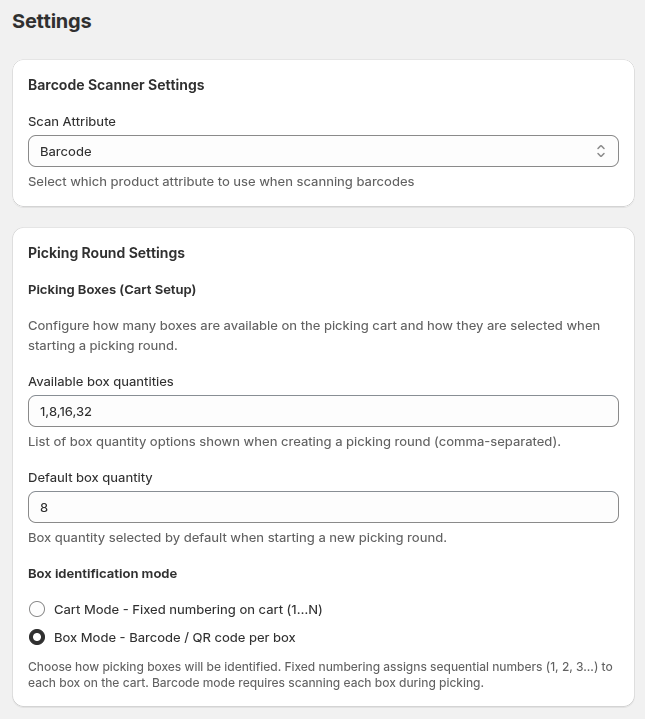
- Cart mode: scan one cart barcode → boxes auto-numbered 1–N, open the cart to access its orders for packing
- Box mode: scan each box individually → the cart is freed after picking and open each box for packing independently
- Issue reporting: mark items as Stock Error, Damaged, or Missing without blocking the round
- Select Complete Picking after every item has been handled; optional picking status tags can be configured
Verify the picked items and save packing. Choose Mark as packed only, or Mark as packed and fulfill in Shopify. Packed does not mean fulfilled or shipped.
- Open an order from the packing queue, a cart, or an individually identified box; each order requires verification
- Item verification with +/− buttons or barcode scanner, with progress bar
- Pack only finishes IPK work without creating fulfillment, updating tracking, or notifying the customer
- Auto-detect carrier from 50+ supported carriers (UPS, FedEx, DHL, Royal Mail, GLS, USPS, Correos…)
- Pack and fulfill saves packing, then creates Shopify fulfillment with optional tracking and customer notification
- Separate packing and fulfillment states, including partial packing; optional IPK: Packed / IPK: Partially packed tags are independent Shopify updates
Workflow overview
Verify physical items → Save packing
Mark as packed only
Finish IPK work. Handle fulfillment through your existing shipping process.
Mark as packed and fulfill in Shopify
Create Shopify fulfillment after packing, with optional tracking and customer notification.
Use a scanner that emits compatible keyboard input. USB, Bluetooth and integrated PDA scanners may require device configuration; Bluetooth may require pairing. Manual entry is also available.
- Check keyboard-input compatibility on your scanner and device
- Global listener — no need to focus a specific input field
- Works with SKU-based or barcode-based scanning (configurable per shop)
- Fast scan detection with 50ms threshold to distinguish scanner from keyboard
- Used in: picking (products), fulfillment (containers), shipping (tracking labels)
The five-step setup wizard prepares the bin metafield, scanner identifier, Shopify stock location, picking workflow, and explicit packing/fulfillment choice. Change these preferences later in Settings.
- Metafield setup: one-time creation of the warehouse location metafield
- Scanner field: choose between product barcode or SKU for scanning
- Picking round settings: configure box quantity options and defaults
- Configure packing behavior and optional status tags; access Import Locations, catalog CSV export and Container Management
Print picking guides from Shopify Admin on desktop. Picking guide printing is currently unavailable inside the Shopify Mobile app on iOS and Android.
Carrier detection helps identify a carrier from a tracking number; it does not buy shipping labels or calculate shipping rates. Changing packing settings does not retroactively fulfill previously packed orders.
Ready to streamline your warehouse?
Join merchants who ship faster with IPK Logistics. Install in seconds, start your 15-day free trial.